
Download XML Model Analyzer – Free XML Editor, Comparison Tool & Syntax Highlighter
Why XML Model Analyzer Stands Out in the XML Editing Landscape
XML Model Analyzer is a purpose‑built, free software solution for Windows developers, database administrators, and IT professionals who work with large, complex XML files generated by modeling tools. In a world where XML is the lingua franca for data interchange, configuration, and model representation, having a reliable editor that can not only display but also compare, sort, and consolidate multiple files is essential. XML Model Analyzer delivers this capability without the bloat of generic IDEs, offering a lightweight yet powerful environment that respects the well‑formed structure of XML while providing visual cues like syntax highlighting.
Its ability to open whole folders of XML files at once and merge them into a single view dramatically reduces the time spent hunting for differences across versions. Moreover, the built‑in sorting algorithms and connection‑information insights help users understand the hierarchy and relationships within their models, turning raw XML into actionable information. Whether you are maintaining a database schema, tracking changes in an engineering model, or simply need a secure, free tool to keep your XML tidy, XML Model Analyzer answers those needs with speed, accuracy, and an intuitive interface.
Core Features That Make XML Model Analyzer a Must‑Have Tool
- Folder‑Wide Loading & Consolidation – Open an entire directory of XML files and combine them into a single, scrollable view for quick cross‑file analysis.
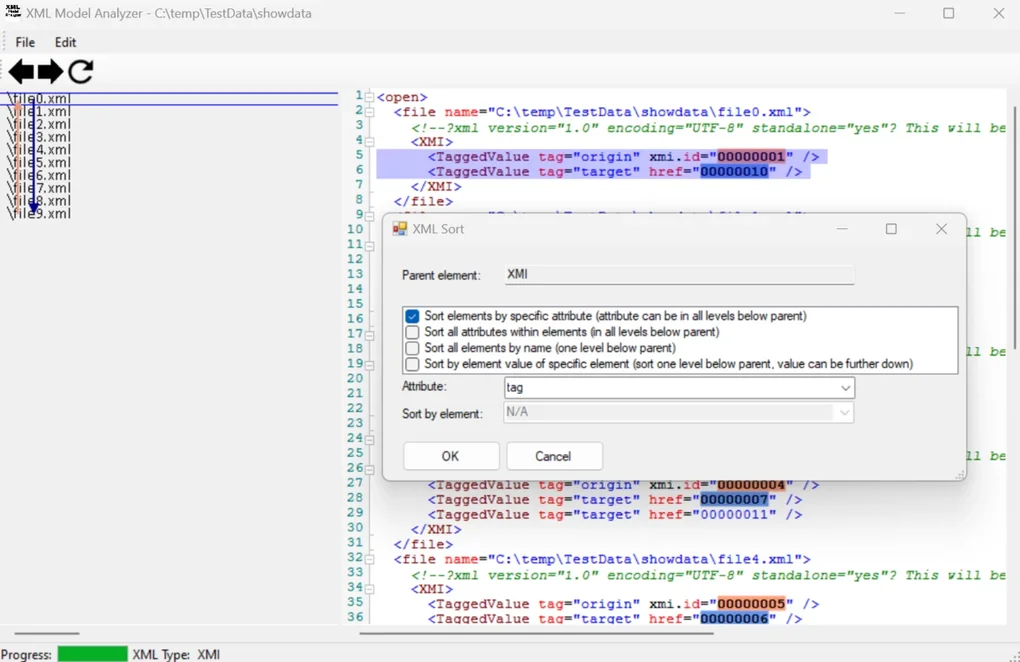
- Advanced Syntax Highlighting – Color‑coded tags, attributes, and values make it easy to spot errors, mismatched tags, or unexpected data.
- Change Comparison Engine – Spot even the smallest differences between two XML models, highlighting altered attributes or elements side‑by‑side.
- Custom Sorting Algorithms – Organize elements alphabetically, by attribute value, or by custom rules to bring order to chaotic files.
- Connection Information Mapping – Visualize relationships between nodes, helping you understand how different parts of the model interact.
- Large File Performance – Optimized memory handling ensures smooth navigation of XML files that are several megabytes in size.
- Free & Secure Distribution – No hidden fees, no ads, and regular updates that keep the software safe from vulnerabilities.
- Export & Save Options – Save your consolidated view as a single XML document or export a diff report for documentation purposes.
Beyond the list above, XML Model Analyzer integrates seamlessly with Windows Explorer, allowing you to right‑click a folder and launch the analyzer directly. The UI is designed for developers who prefer keyboard shortcuts, yet it remains friendly for newcomers who rely on the toolbar icons. The tool also respects XML namespaces, ensuring that documents with complex schemas are parsed correctly. By focusing on the most common pain points—comparison, sorting, and visual clarity—XML Model Analyzer saves hours of manual inspection each week, freeing up resources for higher‑value development tasks.
Installation, First‑Run Guidance, and System Compatibility
Step‑by‑Step Installation on Windows
Downloading XML Model Analyzer is straightforward. Visit the official website, click the “Download for Windows” button, and save the installer XMLModelAnalyzer_Setup.exe. Run the executable; the wizard will guide you through a typical installation process: accept the license agreement, choose the destination folder (default is C:\Program Files\XML Model Analyzer), and optionally create a desktop shortcut. Because the software is free, there is no registration key required. After the installation completes, you can launch the application from the Start menu or by double‑clicking the desktop icon.
First‑Run Configuration
Upon first launch, XML Model Analyzer prompts you to set a default workspace directory. This is where you can point the tool to the folder containing your XML models. The interface then displays a pane on the left showing the directory tree and a central pane where the merged XML view appears. You can enable syntax highlighting in the Preferences dialog, choose your preferred color scheme, and define custom sorting rules if needed. The Help menu provides quick tutorials and keyboard shortcut references to accelerate your onboarding.
Operating System Support
XML Model Analyzer is built exclusively for Windows 10 and later (including Windows 11). It runs on both 64‑bit and 32‑bit architectures, though the 64‑bit version is recommended for handling very large XML files due to better memory management. The application does not require additional runtime environments such as .NET Framework or Java; it ships with all necessary libraries, ensuring a hassle‑free installation.
Updates and Security
The software checks for updates automatically each time it starts. When a new version is available, a non‑intrusive notification appears, allowing you to download and install the patch with a single click. Updates address performance improvements, new sorting algorithms, and security patches to keep the tool resistant to potential exploits that target file‑handling utilities.
Pros, Cons, Frequently Asked Questions, and Final Thoughts
Pros & Cons
- Pros
- Completely free with no hidden costs.
- Handles large XML files without noticeable lag.
- Powerful comparison engine highlights even minor attribute changes.
- Custom sorting and connection mapping provide deeper insight into model structures.
- Intuitive UI with right‑click integration in Windows Explorer.
- Cons
- Available only for Windows; no native macOS or Linux version.
- Advanced visual graphing of connections is limited to textual representation.
- Does not include built‑in XML schema validation (requires external tools).
Frequently Asked Questions
Can XML Model Analyzer compare more than two files at once?
Yes. By loading a folder, you can view all files in a consolidated view and use the “Diff” feature to compare any two files selected from the left‑hand pane.
Is there a limit to the size of XML files the tool can open?
The application is optimized for files up to several hundred megabytes. Performance may degrade on extremely large files (over 1 GB), but most typical model files are well within the supported range.
Do I need an internet connection to use XML Model Analyzer?
No. After installation, the tool works entirely offline. An internet connection is only required for checking updates or downloading the installer.
Can I export the comparison results?
Yes. The “Export Diff” function creates a plain‑text report that lists added, removed, and changed elements, which can be saved for documentation or audit purposes.
Is there any technical support for the free version?
Support is provided through a community forum and an online knowledge base. For critical issues, you can submit a ticket, and the development team typically responds within 48 hours.
Conclusion & Call to Action
XML Model Analyzer fills a niche that many generic XML editors overlook: the ability to compare, sort, and consolidate large sets of model‑generated XML files without charging a dime. Its Windows‑only focus allows the developers to fine‑tune performance and deliver a smooth experience for power users dealing with massive data sets. While the lack of native macOS/Linux versions and advanced visual graphing might be drawbacks for some, the core feature set—especially the folder‑wide loading and precise diff engine—makes it an indispensable companion for anyone maintaining database schemas, engineering models, or configuration files. If you’re looking for a secure, free, and efficient way to keep your XML models organized and error‑free, download XML Model Analyzer today and experience a noticeable boost in productivity.







